Events and seasons
Every event has its own rules.
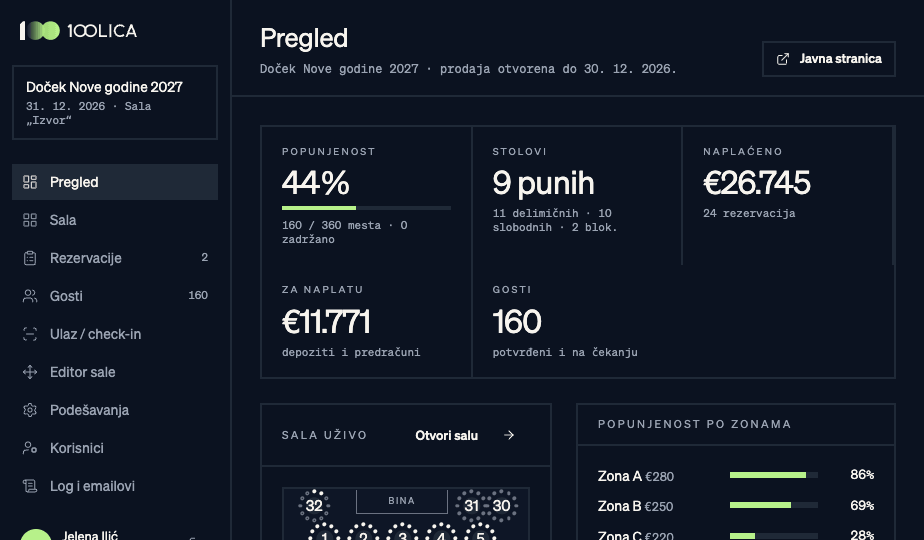
Create an event, choose a room and set seat categories, prices and deadlines. Run a season of events from one overview.
- Seat categories and prices per event
- Payment and cancellation deadlines
- Season overview across events
- Bilingual guest pages (SR and EN)
Online booking
Seat selection, step by step.
Guests choose available seats on the floor plan and enter booking details. Temporary holds expire, and availability is checked when a request is processed.
- Table choice on the floor plan
- Seats held during checkout
- Bot protection
- Confirmation and QR code display
Floor plan
The whole room, live.
Your room drawn exactly as it is: tables, stage, bar, entrances. Every seat shows its status and who sits there.
- Round and rectangular tables, individual seats
- States: free, held, deposit, paid, blocked
- VIP and internal seats off sale
- One map for sales, operations and the door
Payments
Every payment where it belongs.
Authorised staff record verified payments against a booking and track partial amounts and the outstanding balance. A PDF pro forma supports the payment process; it is not a fiscal receipt. Card processing is not currently active.
- Partial payments and outstanding balance
- Manual and bank transfer payments
- PDF pro forma
- Booking deadlines under event settings
Guests
Guests manage their own booking.
Through secure access, guests update names and menu choices for seats already booked. Adding guest details does not increase the number of purchased seats.
- Booking management page
- Booking change records
- Guest records per organisation
- CSV export
A door without a paper list.
Staff scan the QR code with a phone and immediately see the name, table and payment status, then mark who has arrived.
- QR scanning on a phone
- Search by name or booking number
- Arrivals by table
- Several doors at once
Reports
Numbers without building spreadsheets.
Sales, payments and occupancy per event and across the season. Each currency is kept separate.
- Live sales and occupancy
- Financial overview per event
- Season report
- Team activity log
Messages
Emails that sound like your venue.
The product includes email templates and message preparation. Delivery requires separate provider configuration and verification for the organiser; it is not active by default.
- Booking confirmation with QR code
- Reminder templates
- Change notices
- SR and EN templates
Guests see you, not us.
The booking page can reflect the organiser’s brand. Domains, email templates and documents are checked separately within the agreed setup scope.
Your guests are yours.
Separate data
Each organisation's data is kept apart from every other.
Team roles
Sales, finance and door staff see only what they need.
Server-side checks
Prices, discounts and seat states are checked on the server, not in the browser.
Change history
Records help the team follow changes and responsibilities.